
As we prepare to showcase the first in-game footage of Ultimate Farmer, our development team continues to work on several core gameplay systems designed to make operating agricultural machinery both immersive and intuitive.
Today, we're taking a closer look at two of these systems: our Vehicle Heads-Up Display (HUD) and Interactive Controls (IC), both of which play an important role in how players will interact with machinery throughout the game.
While these systems serve different purposes, they share a common design philosophy: providing players with meaningful information and control without introducing unnecessary complexity.
Vehicle HUD
One of our priorities when designing Ultimate Farmer's vehicle interface is ensuring that players have access to the information they need without constantly having to navigate menus or take their attention away from operating machinery.
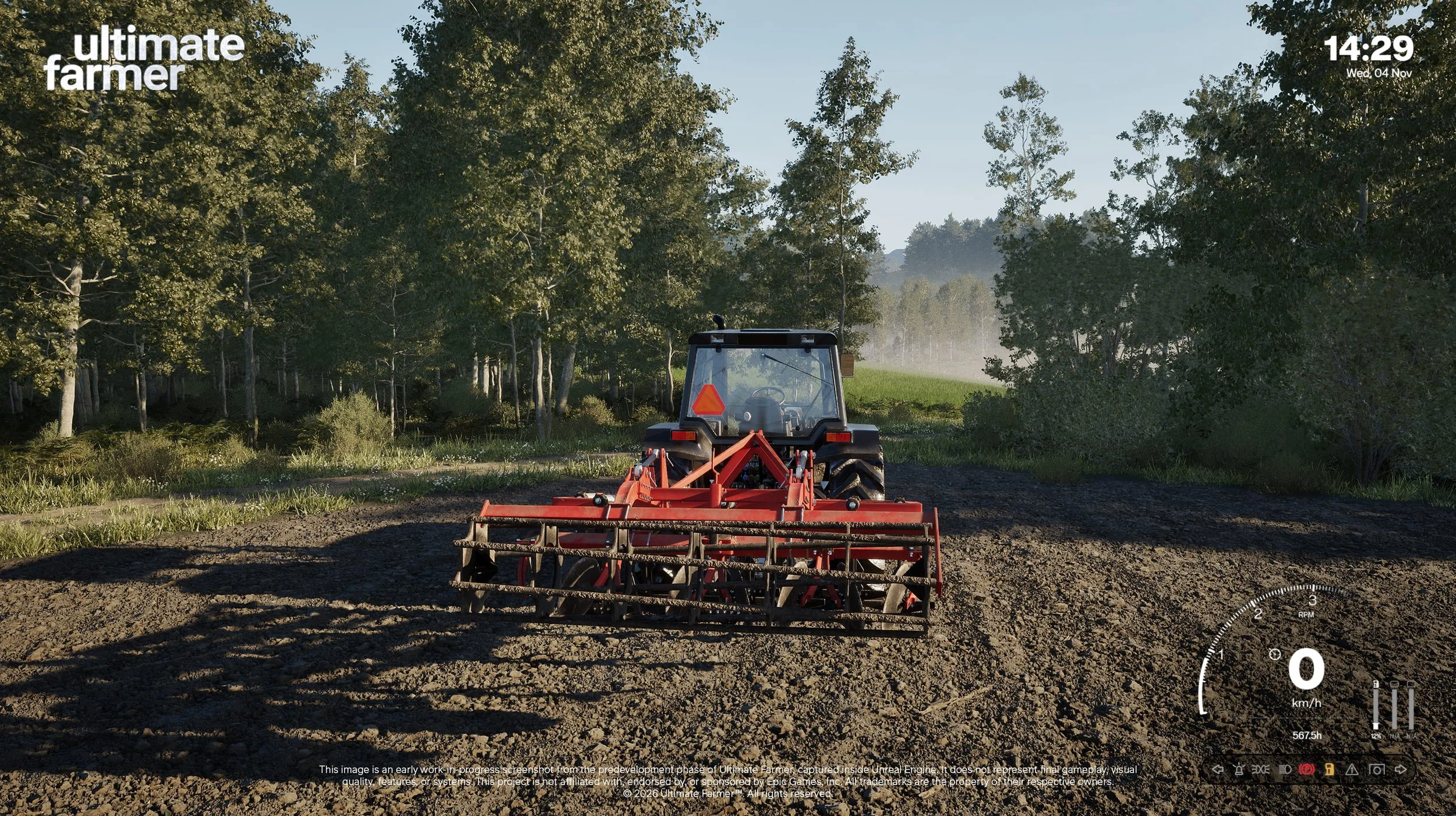
Our Vehicle HUD has been designed to complement the instruments found inside the cabin, displaying essential operating information directly on the screen.
Depending on the vehicle being operated, this includes:
Vehicle speed: A clear, real-time indication of the machine's current travelling speed.
Engine RPM: Information about engine speed, helping players monitor how their machinery is operating.
Fuel levels: An indication of remaining fuel, allowing players to plan their work accordingly.
Warning lights: Visual indicators communicating potential issues or important changes in the vehicle's operating condition.
Additional operating indicators: Vehicle-specific information relevant to the machinery and its available functions.
Rather than developing a single interface that treats every vehicle identically, our intention is to accommodate differences between individual machines and their operating characteristics.
A tractor, combine harvester or other agricultural vehicle may require different information to be presented to the player, and our HUD system is being developed with this flexibility in mind.
Balancing Functionality and Readability
An important consideration during development has been the amount of information displayed on screen.
Agricultural machinery can involve numerous operating parameters, particularly when working with more advanced equipment. However, displaying every available parameter simultaneously would quickly make the interface unnecessarily complicated.
Our approach is therefore to prioritise readability, visual consistency and information hierarchy.
We want players to be able to identify important information at a glance, whether they're travelling between fields, performing agricultural operations or simply exploring the environment.
This becomes particularly important during longer gameplay sessions, where a clear and predictable interface can make a significant difference to the overall experience.
Interactive Controls
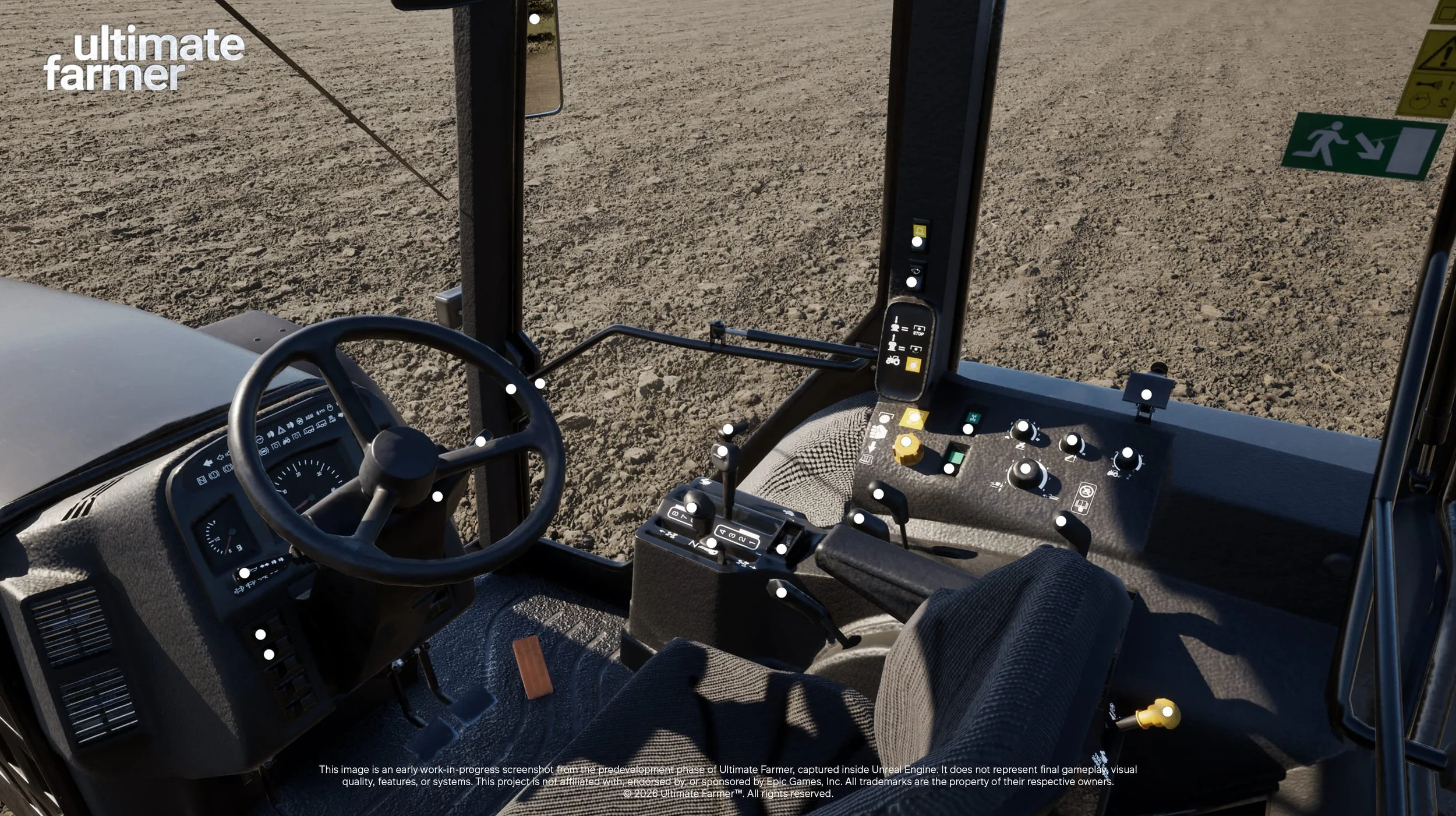
Alongside our Vehicle HUD, we're continuing to develop the Interactive Controls system, which allows players to interact directly with individual components inside vehicle cabins.
Rather than relying exclusively on traditional keyboard commands, players will be able to operate various switches, buttons and levers through direct interaction.
This approach is intended to bring an additional level of authenticity to operating agricultural machinery.
The interior of a tractor is more than simply a place from which to steer the vehicle. It is a working environment containing controls responsible for different mechanical and operational functions.
By making these elements interactive, we want players to feel more connected to the machinery they're operating.
A More Hands-On Experience
For players who enjoy a more simulation-focused experience, Interactive Controls offer an opportunity to become more involved in the process of operating their equipment.
Instead of activating every function through an external interface, players will be able to interact with the relevant controls directly inside the cabin.
Our current implementation includes interaction points associated with individual buttons, switches and levers, with the system being developed to support the different configurations found across agricultural machinery.
This also means that vehicle interiors are being considered not only from a visual perspective, but from a functional one.
The positioning of controls, their accessibility and the way players interact with them are all important considerations when developing a cabin intended to be used during gameplay.
Realism Without Unnecessary Complexity
Although Interactive Controls are an important part of our approach to vehicle simulation, we recognise that not every player wants to operate machinery in exactly the same way.
Some players enjoy interacting with individual controls and following a more hands-on operating process. Others prefer using familiar keyboard shortcuts, particularly when performing repetitive tasks or spending extended periods working in the fields.
We believe both approaches have their place in Ultimate Farmer.
For this reason, many of the functions available through Interactive Controls will also be accessible using keyboard shortcuts.
This allows players to choose how they interact with their machinery without requiring everyone to use the same control method.
For example, a player may prefer operating certain functions directly from the cabin while relying on keyboard commands for others.
Our objective is to provide flexibility while maintaining the depth expected from a farming simulation.
This approach also aligns with our broader development philosophy of creating systems that offer meaningful realism without making everyday gameplay unnecessarily demanding.
Designing Systems for Long-Term Gameplay
When developing Ultimate Farmer, we're looking beyond the initial impression created by individual features.
A system that feels impressive during a short demonstration must also remain practical after dozens or even hundreds of hours of gameplay.
This is particularly relevant to vehicle controls and interfaces, as players will interact with them repeatedly throughout their time in the game.
A visually detailed cabin contributes to immersion, but its controls must also be practical to operate. Similarly, a comprehensive HUD is only useful when the information it provides is presented clearly.
By developing the Vehicle HUD and Interactive Controls alongside our machinery systems, we're working towards an experience in which visual detail, functionality and usability complement one another.
Ultimately, our aim is to make agricultural machinery feel like an integral part of the simulation rather than simply a collection of 3D models with driving functionality.
First Gameplay Footage Coming Soon
The screenshots accompanying this development update were captured directly inside Unreal Engine and demonstrate the current state of our Vehicle HUD and Interactive Controls systems.
Both systems remain under active development and will continue to evolve as we refine their functionality, visual presentation and integration with individual vehicles.
We're also preparing to showcase the first in-game footage of Ultimate Farmer, which will provide a closer look at these systems in action alongside other elements of our ongoing development work.
We're looking forward to sharing more of what our team has been working on.
Stay connected with Ultimate Farmer through our website and community channels for further development updates, behind-the-scenes insights and upcoming gameplay footage.
Development disclaimer: The accompanying images represent early work-in-progress footage captured directly inside Unreal Engine during the pre-development phase of Ultimate Farmer. They do not represent final gameplay, visual quality, features or systems.
